
Ollama Alternatives: When to Switch and What To
/ Arvid Andersson
Ollama is the easiest way to start running models locally, which is exactly why most people reach for it first and then, a few weeks in, start wondering if there is something better. If that is where you are, it helps to notice that "Ollama alternatives" is really two different questions: whether you want a better local tool, or whether you should be running local at all. This guide separates the two, covers when Ollama is still the right call, and routes you to the alternatives by what you actually need, as of June 2026.
Looking for the full list with filters? See all Frameworks & Stacks tools in the directory.
First: do you need to run local at all?
Get clear on this before swapping tools, because switching runtimes will not fix it. For a single user doing interactive work, a hosted frontier model is usually faster and noticeably smarter than a local model on consumer hardware, and you skip the GPU, the power bill, and the maintenance. If speed and quality are what you care about and the data is not sensitive, a subscription is often the simpler answer, and there is no shame in reaching for it.
Running local earns its place for different reasons: keeping data on your own machine, not depending on a provider's pricing or whether a model stays available, high-volume or background work where metered API tokens add up quickly, freedom to experiment without watching a meter, and the plain value of understanding the stack by running it yourself. A common middle path is to build and prototype with a frontier model, then run a local model for the parts of a system that do not need frontier quality. If one of those reasons is yours, local is worth the trouble. If none of them are, it may not be.
When Ollama itself is still fine
For a single developer prototyping locally, Ollama is hard to beat on convenience: install it, pull a model, and you have an OpenAI-compatible endpoint in a minute. The most common way people get a bad first impression is unrelated to the tool, running a model that does not fit their VRAM (a dense model where a smaller or mixture-of-experts model would have fit), then blaming the runtime for being slow. Before switching, the cheap wins are picking a model sized for your hardware and raising the context window (below). If you have done that and still hit a wall, the wall is usually one of the next four things.
The reasons people leave Ollama
- The default context window is small. Ollama defaults to a 4096-token context regardless of what the model supports, and input beyond that is truncated. For long documents, RAG, or agents you can feed in far more than the model actually sees. It is fixable (the
num_ctxparameter, theOLLAMA_CONTEXT_LENGTHvariable, or a Modelfile), but it catches people who do not know to look. - Throughput under load. Ollama is built for one user or a small team. Push real concurrency and throughput drops; it does not do the continuous batching that production servers use.
- Limited low-level control. It hides the knobs. If you need to tune GPU layer offloading across cards, pick a specific quantization, or manage VRAM spill, Ollama surfaces little of that.
- Command line only. No built-in GUI, which is the most common reason non-technical users look elsewhere.
- Transparency and direction. Ollama wraps llama.cpp, and a recurring community complaint is that this is under-acknowledged, so newcomers do not realize what is actually running underneath. The 2026 addition of cloud models also moved the project beyond its local-first origins, which some long-time users see as mission drift.
Pick by what you need
The alternatives sort cleanly by the problem you are solving. Most of the desktop tools wrap the same engine (more on that below), so the choice is about ergonomics and what you need to reach.
You want a GUI or an easier desktop app
LM Studio is the most polished option: a model browser, guided GPU configuration, and a one-click OpenAI-compatible local server. The trade-off is that it is closed source, which matters if you want to audit what runs on your machine. Jan is effectively the open-source version of that experience, auditable and privacy-focused, and it can also call remote providers when you want to. GPT4All is the simplest to get running, aimed at non-technical users who just want a local chat app that works offline.
You want control or more performance
llama.cpp is the engine most of the desktop tools are built on, and running it directly gives you everything they abstract away: GPU layer offloading, quantization choices, context settings, and visibility into exactly what is running. It is MIT-licensed and runs on almost anything. The cost is setup effort, you manage model files and flags yourself, though a separate proxy called llama-swap adds the automatic model switching that was historically a reason to prefer Ollama. Other control-focused options worth knowing are koboldcpp (a single self-contained executable built on llama.cpp) and text-generation-webui for maximum knobs. On Apple Silicon, MLX-LM gives the best throughput for Mac-native inference.
You want an OpenAI-compatible local API stack
LocalAI is a self-hosted, OpenAI-compatible API that runs text, image, and audio models locally, with no GPU required, behind one endpoint. It deploys via Docker, Podman, Kubernetes, or a single binary and keeps data on your machine. It fits when you want a drop-in API replacement and a small local stack rather than a desktop chat app, MIT-licensed and free to self-host.
You need to serve in production
Once you are serving many concurrent users or building a real API, the local desktop tools are the wrong layer. vLLM and SGLang are the common choices: high-throughput serving engines with continuous batching that scale to many simultaneous requests. They need proper GPUs and more setup than Ollama, and vLLM does not run well on Mac. Note that Hugging Face's Text Generation Inference, once a default here, is now in maintenance mode, with Hugging Face pointing users toward vLLM and SGLang instead.
Local is not enough and you need bigger models
Sometimes the honest answer is that the model you want will not fit your hardware. Ollama's own cloud models cover this (running larger models on Ollama's infrastructure while keeping the local workflow), and hosted inference APIs do the same job: OpenRouter gives one API across many models, and providers like Together serve open models at scale. The trade-off is cost and that your data leaves your machine. For routing across several of these, see the AI gateways guide.
They are mostly llama.cpp underneath
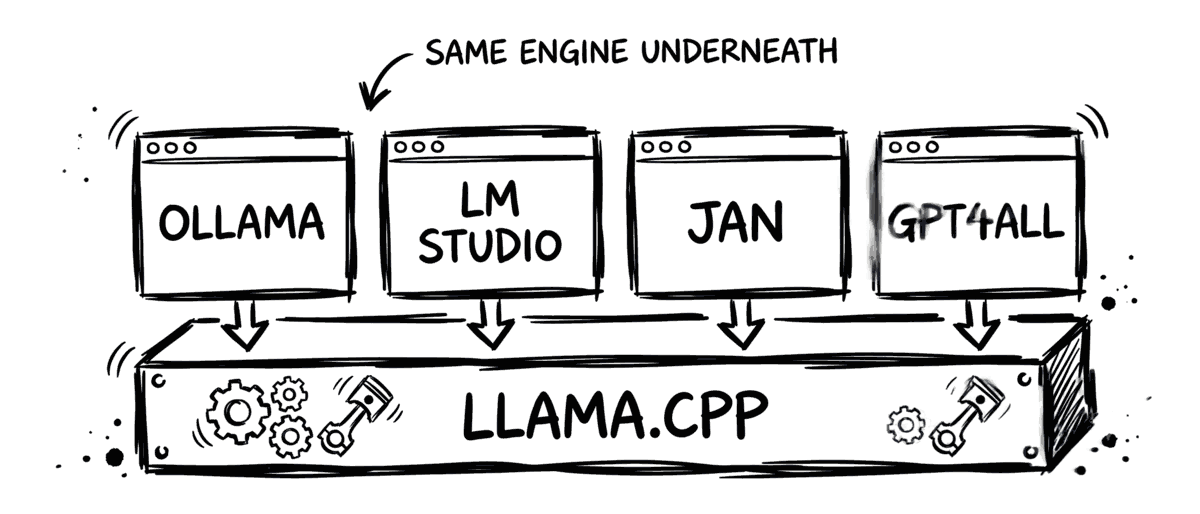
Here is the part that surprises people: Ollama, LM Studio, Jan, and GPT4All are all built on llama.cpp and run the same GGUF model files. The differences between them are ergonomics, defaults, and a little overhead, not fundamentally different engines. That is why raw speed between the desktop tools tends to be close, and why the runtime is rarely the real bottleneck. Model choice and hardware fit matter more, and the biggest genuine performance gains come from a different layer entirely: a production engine like vLLM for concurrency, or MLX on a Mac.
Comparison
| Tool | Best for | Type | Open source |
|---|---|---|---|
 Ollama Ollama |
Easy local start, single user | Local runtime (CLI) | Core open, parts closed |
| LM Studio | Polished desktop GUI | Local runtime (GUI) | No |
| Jan | Open-source GUI, privacy | Local runtime (GUI) | Yes |
 GPT4All GPT4All |
Simplest for non-technical users | Local runtime (GUI) | Yes |
 llama.cpp llama.cpp |
Control and low-level tuning | Inference engine | Yes (MIT) |
| LocalAI | Self-hosted OpenAI-compatible API | Local API runtime | Yes (MIT) |
 vLLM vLLM |
Production serving, concurrency | Inference engine | Yes |
 SGLang SGLang |
Production serving, throughput | Inference engine | Yes |
Types and licensing as of June 2026. Most desktop runtimes are built on llama.cpp.
How to choose
- You want a desktop app, not a terminal: LM Studio for polish, Jan for open source, GPT4All for the simplest start.
- You want control and to understand the stack: llama.cpp directly, plus llama-swap for model switching.
- You want a drop-in local OpenAI-compatible API: LocalAI.
- You are serving many users or building an API: vLLM or SGLang.
- You are on a Mac and want speed: Ollama's MLX backend or MLX-LM directly.
- The model will not fit locally: Ollama Cloud, OpenRouter, or a hosted provider like Together.
The practical move is to try the obvious fix first (right-sized model, larger context window) before switching at all, then pick the alternative that matches the specific wall you hit rather than the one with the most stars.
Related reading
Running models locally is one layer. These cover what sits around it.
Frequently asked questions
Should I use Ollama, or just pay for a frontier model subscription?
For a single user doing interactive work, a hosted frontier model is usually faster and produces better output than a local model on consumer hardware, with no setup to manage. Local runtimes like Ollama make sense for different reasons: keeping data on your own machine, avoiding dependency on a provider's pricing or availability, running high-volume or background work where API tokens would add up, and unlimited experimentation. A common pattern is to build with a frontier model and run a local model for the parts that do not need frontier quality. If quality and speed are all you care about and the data is not sensitive, a subscription is the simpler choice.
Why does my Ollama model seem to ignore the start of long documents?
Ollama uses a default context window of 4096 tokens, regardless of the model's maximum supported context. Input longer than that is truncated, so for long documents, RAG, or agents you can feed in more than the model actually sees. Raise it with the num_ctx parameter, the OLLAMA_CONTEXT_LENGTH environment variable, or a Modelfile. Note that a larger context uses more memory, and if the KV cache spills from VRAM into system RAM, generation slows down sharply.
Is Ollama slower than llama.cpp?
Ollama is a wrapper around llama.cpp, so they share the same underlying engine. Benchmarks from various sources put llama.cpp modestly ahead on raw throughput and prompt processing, because Ollama trades some control for convenience. For single-user interactive use the difference is usually small. It matters more for batch processing, high concurrency, or when you need to tune GPU layers, quantization, or context, which llama.cpp exposes directly and Ollama mostly hides.
What is the best Ollama alternative with a GUI?
LM Studio is the most polished desktop app, with a model browser, guided GPU settings, and a one-click OpenAI-compatible local server, though it is closed source. Jan is the open-source option for people who want an auditable, privacy-focused GUI, and can also call remote providers. GPT4All is the simplest to get running for non-technical users. The choice mostly comes down to how much polish versus open-source transparency you want.
Can Ollama handle multiple concurrent users in production?
It can serve a few parallel requests, but it is built for single-user and small-team use, not high concurrency. For production serving with many concurrent users, vLLM and SGLang are the common choices: they use continuous batching and other optimizations to keep throughput high under load. The trade-off is more setup and proper GPUs. A simple rule: stay on Ollama for one or a few users, move to vLLM or SGLang when you are building an API that serves many.
What is the fastest way to run local models on a Mac?
Apple Silicon Macs benefit from MLX, Apple's framework built for unified memory. As of Ollama 0.19 (March 2026), Ollama itself runs on an MLX backend in preview on Apple Silicon, which Ollama reports as a large speedup, so on a recent Mac you may not need to switch tools to get MLX performance. For maximum control you can also use MLX-LM directly. vLLM does not run well on Mac, so for Mac users the realistic options are Ollama, LM Studio, llama.cpp, or MLX directly.
Is there an Ollama Cloud alternative for models too big to run locally?
Ollama added cloud models that run larger models on Ollama's infrastructure while keeping the local workflow (it requires signing in, and can be disabled for local-only use). If you want bigger models without managing hardware, hosted inference APIs do the same job: OpenRouter gives one API across many models, and providers like Together serve open models at scale. The trade-off versus local is cost and sending data off your machine.
Browse all Frameworks & Stacks tools on Infrabase.ai
AI Infra Digest
One email a month on what's new in AI infrastructure: launches, tools and price changes worth knowing. No spam, unsubscribe any time.
Is your product missing?